designworkplan


Introduction to Wayfinding and Signage design

by Sander Baumann. Average Reading Time: about 5 minutes.

This arti­cle is a intro­duc­tion to sig­nage design and how wayfind­ing works.

You will learn about wayfind­ing, sig­nage design and typog­ra­phy to cre­ate a clear and con­cise wayfind­ing sys­tem that applies the build envi­ron­ment. Please enjoy this arti­cle and let me know your thoughts!

Wayfind­ing basics

Wayfind­ing encom­passes all of the ways in which peo­ple and ani­mals ori­ent them­selves in phys­i­cal space and nav­i­gate from place to place. Wikipedia

Bal­ance and Focus by Sander Baumann

balance and foucs

Nav­i­ga­tion from place to place is a fun­da­men­tal human activ­ity and an inte­gral part of every­day life. Where are you? Where are you head­ing to? Peo­ple use their knowl­edge and pre­vi­ous expe­ri­ences to find their way in the build envi­ron­ment. The human per­cep­tion of the build envi­ron­ment and infor­ma­tion in a space comes down to bal­ance and focus. What do you see? Why did you see it? What did you do with the infor­ma­tion.
Wayfind­ing has the func­tion to inform peo­ple of the sur­round­ings in the (unfa­mil­iar) build envi­ron­ment, it is impor­tant to show infor­ma­tion at strate­gic points to guide peo­ple into the right direc­tions. Com­plex struc­tures in the build envi­ron­ment are inter­preted and stored by the human mem­ory. Dis­tances, loca­tions and time may be remem­bered dif­fer­ently than as they appear to be in reality.

An effec­tive wayfind­ing sys­tem is based on human behav­ior and con­sists of the fol­low­ing characteristics:

  • Do not make them think
    Cre­ate a com­pre­hen­sive, clear and con­sis­tent visual com­mu­ni­ca­tion sys­tem with con­cise messaging.
  • Show only what is needed
    Show infor­ma­tion what rel­e­vant is to the space, loca­tion and / or nav­i­ga­tion path.
  • Remove exces­sive infor­ma­tion
    Remove unnec­es­sary ele­ments to cre­ate a clear visual envi­ron­ment ahead.

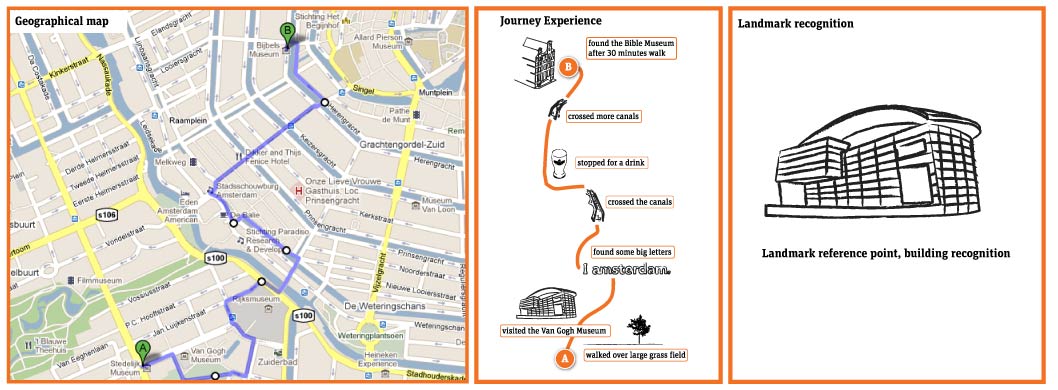
geographical maps vs journey experience

How does wayfind­ing work?

How do peo­ple ori­en­tate, nav­i­gate or remem­ber the build envi­ron­ment? Why will peo­ple rec­og­nize or under­stand one place eas­ier than another? As shown in the images on the left, a geo­graph­i­cal map ver­sus cog­ni­tive (men­tal) map = real­ity ver­sus human men­tal mem­ory. When cre­at­ing a wayfind­ing scheme the fol­low­ing char­ac­ter­is­tics influ­ences the way we inter­preted the build environment.

  • Land­marks
    To cre­ate a leg­i­ble envi­ron­ment it is nec­es­sary to mark spe­cific spaces and / or loca­tions. This rein­forces the recog­ni­tion of places and plays a part in over­see­ing a larger area. With the use of land­marks and mark­ing ele­ments an area will become more vis­i­ble and will be under­stand bet­ter in the human mem­ory. Land­marks can be art-objects, build­ings, stree­tart, wayfind­ing signs or strik­ing ele­ments in a land­scape. These ele­ments com­bined will shape the iden­tity of an (unknown) area as seen from your perspective.

  • Ori­en­ta­tion
    In order to nav­i­gate, you need to know where you are in the build envi­ron­ment and where other des­ti­na­tions are located. Prefer­able it is good to know the dis­tance in time from one place to another. If you are able to ori­en­tate your­self within the build envi­ron­ment, it will be eas­ier to under­stand des­ti­na­tions and to nav­i­gate by land­marks. In wayfind­ing, maps are com­mon used to indi­cate your loca­tion. The usage of maps is a very pow­er­ful way of express­ing and over­see­ing the build envi­ron­ment. Be sure to dis­play the maps heads-up in the direc­tion you are fac­ing, this way you can easy relate your­self to the build environment.

  • Nav­i­ga­tion
    Nav­i­gat­ing the phys­i­cal ref­er­ence to a par­tic­u­lar area, set­ting or des­ti­na­tion. With the usage of direc­tional (sta­tic) signs peo­ple will be guided along their path towards destination(s).

Strate­gic wayfind­ing design

When cre­at­ing a sig­nage sys­tem for an area, build­ing or archi­tec­tural struc­ture it is essen­tial to develop a strate­gic wayfind­ing scheme. With this step you are able to build up a mod­u­lar wayfind­ing sys­tem that will adapt to the build envi­ron­ment and the human expec­ta­tions for ori­en­ta­tion and nav­i­ga­tion pur­poses. Research is an impor­tant step to under­stand the build envi­ron­ment and where infor­ma­tion is needed to max­i­mize leg­i­bil­ity of the wayfind­ing system.

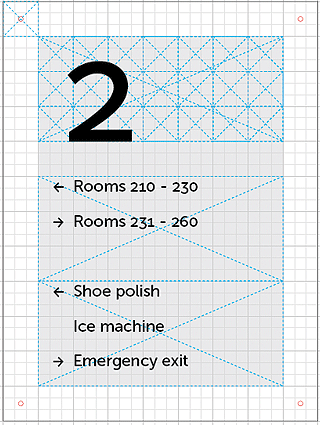
hotel-signage-grid-template

Sig­nage design basics

In basics there are four impor­tant type of signs: Infor­ma­tion signs, for instance a sign­pole with locate a des­ti­na­tion and / or to ori­en­tate your­self in the build envi­ron­ment. Direc­tional signs, where infor­ma­tion is dis­played to find des­ti­na­tions, located on sev­eral strate­gic points in the build envi­ron­ment. Iden­ti­fi­ca­tion signs, where infor­ma­tion about indi­vid­ual loca­tions is dis­played such as build­ings, loca­tions and pub­lic facil­i­ties. Warn­ing signs, to indi­cate safety pro­ce­dures such as a fire escape routes, no smok­ing areas and other reg­u­la­tions that is, or is not allowed in a spe­cific area.

To make a sig­nage sys­tem work together a design grid is used to order infor­ma­tion and to scale the signs to dif­fer­ent sizes, as part of the sign fam­ily. With the exam­ple design I have used a base grid of 30 mm (milime­ters) with a sub­di­vi­sion of 9. All the mea­sure­ments of the exam­ple are based on the 9x9 divi­sion. Be care­ful not to show too much infor­ma­tion into one sign, this will be eas­ily over­looked, instead use mul­ti­ple signs to get good wayfind­ing results.

Sig­nage typeface

A sig­nage type­face is usu­ally a sans-serif type and avail­able in var­i­ous weights with a sim­ple easy-to-read straight­for­ward design. They have a good leg­i­bil­ity with a large X-Height and wide let­ter pro­por­tions with promi­nent ascen­ders / descen­ders to ensure a good readability.

When using an easy-to-read font the type­face is rec­og­niz­able for many peo­ple to read and to under­stand the mes­sage clearly. There­fore the choice of a sig­nage type­face is one of the key­fac­tors in order to make a wayfind­ing sys­tem work. When select­ing a type­face for a sig­nage design / wayfind­ing project please use the fol­low­ing characteristics:

  • A clear and straight­for­ward type design, sans-serif
  • Easy rec­og­niz­able letterforms
  • Pos­i­tive let­ter spac­ing to enhance the visual appearance
  • The Font Fam­ily includes a pack­age of many dif­fer­ent weights
  • The type­face has a large X-height for good readability

In a follow-up arti­cle on design­work­plan I will go deeper into select­ing type­faces for sig­nage design / wayfinding.

Sig­nage design

Be con­sis­tent in typog­ra­phy, type height, icons, grid design, color and mate­r­ial choice. The signs needs to be straight for­ward designed and in a con­sis­tent order to wayfind­ing scheme, always use the same order of dis­play­ing the infor­ma­tion. Remem­ber to make sam­ples of the dif­fer­ent sign types and check them in the build envi­ron­ment to ensure it becomes a best-practice design.

See the arti­cle about sig­nage and color con­trast for more infor­ma­tion about color usage in wayfinding.

wayfinding design

Next up

Please let me know your thoughts about sig­nage design and wayfind­ing in the com­ments. Thank you!


22 comments on ‘Introduction to Wayfinding and Signage design’

  1. jeffwongdesign

    great arti­cle!

  2. Jason Wisdom

    Bril­liantly writ­ten arti­cle, whether it be maps or busi­ness model design the same rules apply

  3. […] Visit Source 0 Comments […]

  4. Hannes

    Wow, well-written arti­cles like these are rare!
    It was a plea­sure reading/sharing it.

    Few years back I did a sig­nage project for a school cam­pus. And I must admit, the type­face is crucial.

    Can’t wait to read your follow-up arti­cle. :-)
    grts

  5. Sander Baumann

    Thank you jef­f­wongde­sign and Jason Wis­dom for your pos­i­tive feed­back, much appreciated!

    Thanks for your com­ment Hannes, totally agree with you. I see many signs designed by a graphic designer, where it should be designed by a infor­ma­tion designer.

  6. Jon Elliman

    Excel­lent arti­cle as ever.

  7. Youssef Sarhan

    Some use­ful tips here Sander. You should think about doing an arti­cle on grid sys­tems within signs. I’m lik­ing the direc­tion of this blog. I’ve been mean­ing to post a chap­ter from my dis­ser­ta­tion. Still try­ing to tidy my blog up.

    Keep the posts coming!

  8. Sander Baumann

    Thank you Jon Elli­man for your com­ment, appreciated!

    Most def­i­nitely Youssef Sarhan, please write about your dis­ser­ta­tion, look­ing for­ward to it. Hope­fully will find the time to write about sig­nage design more. Thanks for your comment!

  9. Ryan Lascano

    Sander, this is a ter­rific arti­cle! Well writ­ten, clear and con­cise, and an excel­lent primer on the basics of wayfind­ing design. Excited for the fol­lowup on select­ing typefaces!

  10. Richard Hoefer

    Sander, I was slighly amused when I saw this article’s title rec­om­mended by a post today from one of the User Expe­ri­ence Design peo­ple I fol­low on twit­ter. Why amused? Because I am in process of edit­ing video on an very infor­mal CASE STUDY on the dia­met­ric oppo­site of wayfind­ing and sig­nage design. If I were to write the book, it would be called “Wayfind­ing Uncon­sid­ered: Des­ti­na­tion Obstruc­tion Design at San Fran­cisco Inter­na­tional Airport”.

    I have been flown in and out of many an air­port across the world, from huge major oper­a­tions like that of Frank­furt, Ger­many (a minia­ture city unto itself) all the way down to lit­tle Island air­ports like St. Thomas, U.S. Vir­gin Islands maybe 35 years ago when I was just a kid … back when all they had was one big open-air thatched roof pavil­lion as the ter­mi­nal itself, which, to the best of my child­hood rec­ol­lec­tion, used sim­ple chalk­boards to indi­cate air­line names, flight num­bers, gate num­bers and arrows towards the plane.

    More recently I was in a very remote part of North East­ern Cam­bo­dia, only recently opened up to “tourism” (if one can call it that) in areas that have been care­fully swept clear of land mines from war era. THAT “air­port” was like a high­school foot­ball field with a main­te­nance shack.

    And I can hon­estly say, and with no exag­ger­a­tion, even these “mid­dle of nowhere” third world oper­a­tions han­dle “wayfind­ing” way-better and more com­pe­tently than SFO — San Fran­cisco Inter­na­tional. And I am speak­ing specif­i­cally of our Inter­na­tional Ter­mi­nal, not domes­tic — which oper­ates just fine, sig­nage works, every­thing is “normal”.

    All I can tell you is, I would love to be able to pub­lish these videos here, or find a way to per­haps make it an inter­ac­tive expe­ri­ence. Because I really don’t believe most peo­ple can begin to imag­ine just how bad and com­pletely dys­func­tional it can be. And I mean com­pletely. The air­port BANS air­line brand­ing sig­nage in this “designer” ter­mi­nal, denud­ing it by order so as to not dis­rupt their beau­ti­ful industrial-designed sparse walls. Every sin­gle con­ven­tion and user expec­ta­tion of “how one finds the ticket counter for my air­line” is flipped on its head.

    And in these videos, I take a first per­son view from being dropped off at the curb­side, then look­ing for the exter­nal sig­nage for the air­line I am fly­ing out on, to then find­ing that air­line inside.

    90% of the time at air­ports, the con­fu­sions come with “where is my GATE and how do I get there?” … But at SFO, they do not waste any time at all. The prob­lem begins at curb­side: “Where is my airline?”

    I am ashamed for my city, ashamed for my pro­fes­sion, and appalled that through these walk­ways travel peo­ple staffing Google and Yahoo and Ora­cle and HP — and not a word from the infor­ma­tion design­ers there all these years. No civic respon­si­bil­ity. Talk­ing to the counter per­son­nel at United Air­lines alone and their hear­ing “wait, you mean to tell me you’re actu­ally doc­u­ment­ing this prob­lem? Oh my god, where have you been?” Then to hear their sto­ries! Every sin­gle day a night­mare in com­pen­sa­tion for the non-design of SFO.

    sorry for the length of my reply. As you know, one of the best ways to learn the affir­ma­tive is to spot the fail­ures and solve the sit­u­a­tions they present.

    Many peo­ple might be baf­fled to dis­cover, but I am utterly amazed (and embar­rassed by, for my city) what I think is the worst

  11. Alex

    Dear Sander

    Many con­grats on yor post,keep on .….
    In which pro­gram do you work on your design­ing.
    Adobe Illus­tra­tor or?

  12. David Mearns

    Excel­lent read, accu­rate and to the point — just how wayfind­ing should be.

  13. Sander Baumann

    @Alex, Thanks for ask­ing. Indeed all of the graphic sig­nage design work is being per­formed in Adobe Illus­tra­tor. Ser­ial graphic design is designed in Illus­tra­tor but cre­ated using Inde­sign and Excel. In this com­bi­na­tion you can rapidly cre­ate many, many signs.

    signage design

    @David Mearns, thank you for your kind message.

  14. Hannes

  15. Larry Cohen

    NOT all Envi­ron­men­tal Graphic Design is done in Adobe Illus­tra­tor. That is a very naive com­ment. Sorry, Adobe prod­ucts are great, I use many, but Corel­Draw is designed for cre­at­ing Sig­nage and EGD with­out exter­nal p-lug-ins [as with Adobe Illustrator].

    I agree, Illus­tra­tor is more com­mon, but NOT eas­ier to use.

  16. Sander Baumann

    @Larry Cohen, Thanks for your com­ment. I’m con­fi­dent there is other soft­ware avail­able than Adobe prod­ucts which is also capa­ble of cre­at­ing sig­nage design. All com­pa­nies in the field has their own work­ing method and from my believes Adobe prod­ucts are widely accepted which allows you to eas­ily com­mu­ni­cate from designer to manufacturer.

  17. Alex

    Can you tell as from what mate­r­ial wayfind­ing signs are made of?
    You can write some arti­cle on this case too.…

  18. […] read this brief arti­cle. Much of what it says is man­i­fest in all good wayfnd­ing and sig­nage design: http://www.designworkplan.com/wayfinding/introduction.htm GA_googleAddAttr(“AdOpt”, “1”); GA_googleAddAttr(“Origin”, “other”); GA_googleAddAttr(“LangId”, […]

  19. […] Intro­duc­tion to Wayfind­ing and Sig­nage design. […]

  20. Chris Au

    Hello Sander;

    There is cur­rently a dis­cus­sion on LinkedIn’s Wayfind­ing Group regard­ing direc­tion arrows: http://tinyurl.com/3kpn95a.
    I would be inter­ested in your thoughts either here or in the dis­cus­sion group, of which, I note, you are a member.

    Cheers;
    Chris

  21. Alice

    Great arti­cle! I would just add that effec­tive wayfind­ing sys­tems also rely a lot on the mate­ri­als cho­sen, fur­nish­ings and fin­ishes of the built envi­ron­ment…
    http://www.bpconcepts.com.au/content_common/pg-wayfinding-signage.seo

Leave a Reply